
Print Nightmare Vulnerability Fix
When print capabilities are accessible to the Internet, attackers may take advantage of them remotely. Attackers may also exploit it to elevate system privileges after gaining a foothold within a susceptible network through another vulnerability. In either scenario, the attackers may take control of the domain controller, which is one of the most security-sensitive assets on any Windows network since it is the server that authenticates local users.
According to experts, a major security vulnerability in all supported versions of Windows that enables attackers to take control of infected computers and execute malware of their choosing is not completely fixed by an emergency patch released by Microsoft on Tuesday.
The threat, dubbed PrintNightmare, is caused by flaws in the Windows print spooler, which allows users to print inside their local networks. The proof-of-concept exploit code was made public before being taken back, but not before it was duplicated by others. CVE-2021-34527 is the name given to the vulnerability by researchers.
Print Nightmare Vulnerability Fix from Microsoft
Determine if the Print Spooler service is running
Run the following in Windows PowerShell:
Get-Service -Name Spooler
If the Print Spooler is running or if the service is not set to disabled, select one of the following options to either disable the Print Spooler service, or to Disable inbound remote printing through Group Policy:
Option 1 - Disable the Print Spooler service
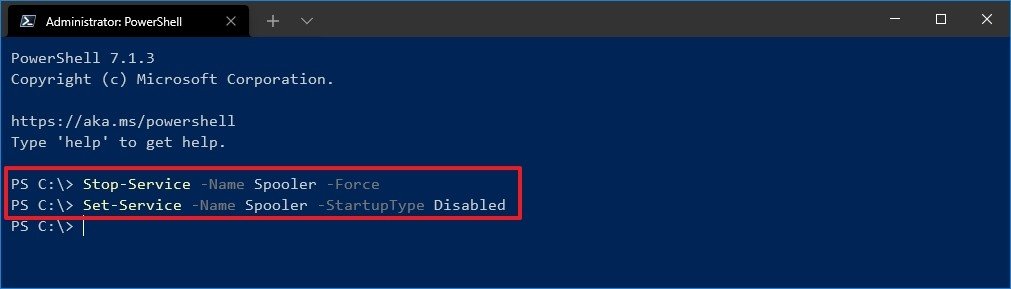
If disabling the Print Spooler service is appropriate for your enterprise, use the following PowerShell commands:
Stop-Service -Name Spooler -Force
Set-Service -Name Spooler -StartupType Disabled
Impact of workaround Disabling the Print Spooler service disables the ability to print both locally and remotely.
Option 2 - Disable inbound remote printing through Group Policy
You can also configure the settings via Group Policy as follows:
Computer Configuration / Administrative Templates / Printers
Disable the “Allow Print Spooler to accept client connections:” policy to block remote attacks.
You must restart the Print Spooler service for the group policy to take effect.

You must be logged in to post a comment.